> ## Documentation Index
> Fetch the complete documentation index at: https://unstructured-53-docs-243-plugins.mintlify.site/llms.txt
> Use this file to discover all available pages before exploring further.
# Overview
The Unstructured Partition Endpoint, part of the [Unstructured API](/api-reference/overview), is intended for rapid prototyping of Unstructured's
various partitioning strategies, with limited support for chunking. It is designed to work only with processing of local files, one file
at a time. Use the [Unstructured Workflow Endpoint](/api-reference/workflow/overview) for production-level scenarios, file processing in
batches, files and data in remote locations, generating embeddings, applying post-transform enrichments, using the latest and
highest-performing models, and for the highest quality results at the lowest cost.
## Get started
To call the Unstructured Partition Endpoint, you need an Unstructured account and an Unstructured API key:
1. Go to [https://platform.unstructured.io](https://platform.unstructured.io) and use your email address, Google account, or GitHub account to
sign up for an Unstructured account (if you do not already have one) and sign into the account at the same time. The
[Unstructured user interface (UI)](/ui/overview) appears.
2. Get your Unstructured API key:
a. In the Unstructured UI, click **API Keys** on the sidebar.
b. Click **Generate API Key**.
c. Follow the on-screen instructions to finish generating the key.
d. Click the **Copy** icon next to your new key to add the key to your system's clipboard. If you lose this key, simply return and click the **Copy** icon again.
By following the preceding instructions, you are signed up for a [Developer](https://unstructured.io/developers) pay per page account by default.
To save money, consider switching to a [Subscribe & Save](https://unstructured.io/subscribeandsave) account instead. To save even more money,
consider switching to an [Enterprise](https://unstructured.io/enterprise) account instead.
[Try the quickstart](#quickstart).
## Set up billing
If you signed up for a pay-per-page plan, you can enjoy a free 14-day trial with usage capped at 1000 pages per day.
If you initially signed up for a subscribe-and-save plan instead, of if you signed up through the [For Enterprise](https://unstructured.io/enterprise) page instead, your billing setup and terms will
be different. For billing guidance, contact Unstructured Sales at [sales@unstructured.io](mailto:sales@unstructured.io).
At the end of the 14-day free trial, or if you need to go past the trial's page processing limits during the 14-day free trial, you must set up your billing information to keep using
the Unstructured Partition Endpoint:
 1. Sign in to your Unstructured account, at [https://platform.unstructured.io](https://platform.unstructured.io).
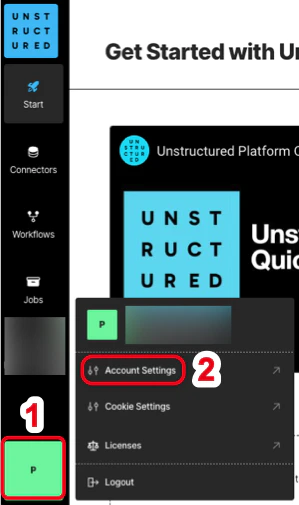
2. At the bottom of the sidebar, click your user icon, and then click **Account Settings**.
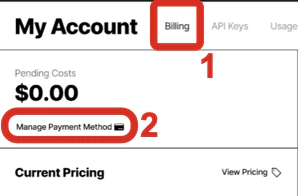
3. Click the **Billing** tab.
4. Click **Manage Payment Method**, follow the on-screen instructions to enter or update your payment details, and then click **Save card**.
Your card is billed monthly based on your usage. The **Billing** page shows a billing overview for the current month and a list of your billing invoices.
You can save money by switching from a pay-per-page plan to a subscribe-and-save plan. To do this,
go to the [Unstructured Subscribe & Save](https://unstructured.io/subscribeandsave) page and complete the on-screen instructions.
We calculate a page as follows:
* For these file types, a page is a page, slide, or image: .pdf, .pptx, and .tiff.
* For .docx files that have page metadata, we calculate the number of pages based on that metadata.
* For all other file types, we calculate the number of pages as the file's size divided by 100 KB.
* For non-file data, we calculate a page as 100 KB of incoming data to be processed.
## Quickstart
This example uses the [curl](https://curl.se/) utility on your local machine to call the Unstructured Partition Endpoint. It sends a source (input) file from your local machine to the Unstructured Partition Endpoint which then delivers the processed data to a destination (output) location, also on your local machine. Data is processed on Unstructured-hosted compute resources.
If you do not have a source file readily available, you could use for example a sample PDF file containing the text of the United States Constitution,
available for download from [https://constitutioncenter.org/media/files/constitution.pdf](https://constitutioncenter.org/media/files/constitution.pdf).
From your terminal or Command Prompt, set the following two environment variables.
* Replace `` with the Unstructured Partition Endpoint URL, which is `https://api.unstructuredapp.io/general/v0/general`
* Replace `` with your Unstructured API key, which you generated earlier on this page.
```bash theme={null}
export UNSTRUCTURED_API_URL=
export UNSTRUCTURED_API_KEY=""
```
Run the following `curl` command, replacing `` with the path to the source file on your local machine.
If the source file is not a PDF file, then remove `;type=application/pdf` from the final `--form` option in this command.
```bash theme={null}
curl --request 'POST' \
"$UNSTRUCTURED_API_URL" \
--header 'accept: application/json' \
--header "unstructured-api-key: $UNSTRUCTURED_API_KEY" \
--header 'content-Type: multipart/form-data' \
--form 'content_type=string' \
--form 'strategy=vlm' \
--form 'vlm_model_provider=openai' \
--form 'vlm_model=gpt-4o' \
--form 'output_format=application/json' \
--form 'files=@;type=application/pdf'
```
After you run the `curl` command, the results are printed to your terminal or Command Prompt. The command might take several
minutes to complete.
By default, the JSON is printed without indenting or other whitespace. You can pretty-print the JSON output by using utilities such as [jq](https://jqlang.org/tutorial/) in future command runs.
You can also pipe the JSON output to a local file by using the `curl` option [-o, --output \](https://curl.se/docs/manpage.html#-o) in future command runs.
You can also call the Unstructured Partition Endpoint by using the [Unstructured Python SDK](/api-reference/partition/sdk-python) or the [Unstructured JavaScript/TypeScript SDK](/api-reference/partition/sdk-jsts).
## Telemetry
We’ve partnered with [Scarf](https://scarf.sh) to collect anonymized user statistics to understand which features our community is using and how to prioritize product decision-making in the future.
To learn more about how we collect and use this data, please read our [Privacy Policy](https://unstructured.io/privacy-policy).
To opt out of this data collection, you can set the environment variable `SCARF_NO_ANALYTICS=true` before running any commands that call Unstructured hosted APIs.
1. Sign in to your Unstructured account, at [https://platform.unstructured.io](https://platform.unstructured.io).
2. At the bottom of the sidebar, click your user icon, and then click **Account Settings**.
3. Click the **Billing** tab.
4. Click **Manage Payment Method**, follow the on-screen instructions to enter or update your payment details, and then click **Save card**.
Your card is billed monthly based on your usage. The **Billing** page shows a billing overview for the current month and a list of your billing invoices.
You can save money by switching from a pay-per-page plan to a subscribe-and-save plan. To do this,
go to the [Unstructured Subscribe & Save](https://unstructured.io/subscribeandsave) page and complete the on-screen instructions.
We calculate a page as follows:
* For these file types, a page is a page, slide, or image: .pdf, .pptx, and .tiff.
* For .docx files that have page metadata, we calculate the number of pages based on that metadata.
* For all other file types, we calculate the number of pages as the file's size divided by 100 KB.
* For non-file data, we calculate a page as 100 KB of incoming data to be processed.
## Quickstart
This example uses the [curl](https://curl.se/) utility on your local machine to call the Unstructured Partition Endpoint. It sends a source (input) file from your local machine to the Unstructured Partition Endpoint which then delivers the processed data to a destination (output) location, also on your local machine. Data is processed on Unstructured-hosted compute resources.
If you do not have a source file readily available, you could use for example a sample PDF file containing the text of the United States Constitution,
available for download from [https://constitutioncenter.org/media/files/constitution.pdf](https://constitutioncenter.org/media/files/constitution.pdf).
From your terminal or Command Prompt, set the following two environment variables.
* Replace `` with the Unstructured Partition Endpoint URL, which is `https://api.unstructuredapp.io/general/v0/general`
* Replace `` with your Unstructured API key, which you generated earlier on this page.
```bash theme={null}
export UNSTRUCTURED_API_URL=
export UNSTRUCTURED_API_KEY=""
```
Run the following `curl` command, replacing `` with the path to the source file on your local machine.
If the source file is not a PDF file, then remove `;type=application/pdf` from the final `--form` option in this command.
```bash theme={null}
curl --request 'POST' \
"$UNSTRUCTURED_API_URL" \
--header 'accept: application/json' \
--header "unstructured-api-key: $UNSTRUCTURED_API_KEY" \
--header 'content-Type: multipart/form-data' \
--form 'content_type=string' \
--form 'strategy=vlm' \
--form 'vlm_model_provider=openai' \
--form 'vlm_model=gpt-4o' \
--form 'output_format=application/json' \
--form 'files=@;type=application/pdf'
```
After you run the `curl` command, the results are printed to your terminal or Command Prompt. The command might take several
minutes to complete.
By default, the JSON is printed without indenting or other whitespace. You can pretty-print the JSON output by using utilities such as [jq](https://jqlang.org/tutorial/) in future command runs.
You can also pipe the JSON output to a local file by using the `curl` option [-o, --output \](https://curl.se/docs/manpage.html#-o) in future command runs.
You can also call the Unstructured Partition Endpoint by using the [Unstructured Python SDK](/api-reference/partition/sdk-python) or the [Unstructured JavaScript/TypeScript SDK](/api-reference/partition/sdk-jsts).
## Telemetry
We’ve partnered with [Scarf](https://scarf.sh) to collect anonymized user statistics to understand which features our community is using and how to prioritize product decision-making in the future.
To learn more about how we collect and use this data, please read our [Privacy Policy](https://unstructured.io/privacy-policy).
To opt out of this data collection, you can set the environment variable `SCARF_NO_ANALYTICS=true` before running any commands that call Unstructured hosted APIs.