> ## Documentation Index
> Fetch the complete documentation index at: https://unstructured-53-docs-243-plugins.mintlify.site/llms.txt
> Use this file to discover all available pages before exploring further.
# Process an individual file by making a direct POST request
Watch the following 4-minute video to learn how to make POST requests to the Unstructured Partition Endpoint to process individual files:
Open the related [notebook](https://colab.research.google.com/drive/1rJOZYZfsTQ_JV2hXaY4kgYvbA7xEWBZn?usp=sharing) that is shown in the preceding video.
To make POST requests to the Unstructured Partition Endpoint, you will need:
These environment variables:
* `UNSTRUCTURED_API_KEY` - Your Unstructured API key value.
* `UNSTRUCTURED_API_URL` - Your Unstructured API URL.
To get your API key, do the following:
1. Go to [https://platform.unstructured.io](https://platform.unstructured.io) and use your email address, Google account, or GitHub account to
sign up for an Unstructured account (if you do not already have one) and sign into the account at the same time. The
[Unstructured user interface (UI)](/ui/overview) appears.
2. Get your Unstructured API key:
a. In the Unstructured UI, click **API Keys** on the sidebar.
b. Click **Generate API Key**.
c. Follow the on-screen instructions to finish generating the key.
d. Click the **Copy** icon next to your new key to add the key to your system's clipboard. If you lose this key, simply return and click the **Copy** icon again.
By following the preceding instructions, you are signed up for a [Developer](https://unstructured.io/developers) pay per page account by default.
To save money, consider switching to a [Subscribe & Save](https://unstructured.io/subscribeandsave) account instead. To save even more money,
consider switching to an [Enterprise](https://unstructured.io/enterprise) account instead.
The API URL is `https://api.unstructuredapp.io/general/v0/general`
Let's start with a simple example in which you use [curl](https://curl.se/) to send a local PDF file (`*.pdf`) to partition via the Unstructured Partition Endpoint.
In this command, be sure to replace `` with the path to your local PDF file.
```bash theme={null}
curl --request 'POST' \
"$UNSTRUCTURED_API_URL" \
--header 'accept: application/json' \
--header "unstructured-api-key: $UNSTRUCTURED_API_KEY" \
--header 'content-Type: multipart/form-data' \
--form 'content_type=string' \
--form 'strategy=vlm' \
--form 'vlm_model_provider=openai' \
--form 'vlm_model=gpt-4o' \
--form 'output_format=application/json' \
--form 'files=@;type=application/pdf'
```
In the example above we're representing the API endpoint with the environment variable `UNSTRUCTURED_API_URL`. Note, however, that you also need to authenticate yourself with
your individual API Key, represented by the environment variable `UNSTRUCTURED_API_KEY`. Learn how to obtain an API URL and API key in the [Unstructured Partition Endpoint guide](/api-reference/partition/overview).
## Parameters & examples
The API parameters are the same across all methods of accessing the Unstructured Partition Endpoint.
* Refer to the [API parameters](/api-reference/partition/api-parameters) page for the full list of available parameters.
* Refer to the [Examples](/api-reference/partition/examples) page for some inspiration on using the parameters.
[//]: # "TODO: when we have the concepts page shared across products, link it from here for the users to learn about partition strategies, chunking strategies and other important shared concepts"
## Postman collection
Unstructured offers a [Postman collection](https://learning.postman.com/docs/collections/collections-overview/) that you can import into Postman to make POST requests through a graphical user interface.
1. [Install Postman](https://learning.postman.com/docs/getting-started/installation/installation-and-updates/).
2. [Sign in to Postman](https://learning.postman.com/docs/getting-started/installation/postman-account/#signing-in-to-postman).
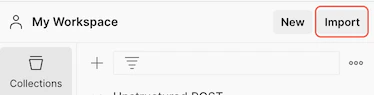
3. In your workspace, click **Import**.
4. In the **Paste cURL, Raw text or URL** box, enter the following URL, and then press `Enter`:
```
https://raw.githubusercontent.com/Unstructured-IO/docs/main/examplecode/codesamples/api/Unstructured-POST.postman_collection.json
```
5. On the sidebar, click **Collections**.
6. Expand **Unstructured POST**.
7. Click **(Partition Endpoint) Basic Request**.
8. On the **Headers** tab, next to `unstructured-api-key`, enter your Unstructured API key in the **Value** column.
9. On the **Body** tab, next to `files`, click the **Select files** box in the **Value** column.
10. Click **New file from local machine**.
11. Browse to and select the file that you want Unstructured to process.
12. Click **Send**. Processing could take several minutes.
To download the processed data to your local machine, in the response area, click the ellipses, and then click **Save response to file**.
 4. In the **Paste cURL, Raw text or URL** box, enter the following URL, and then press `Enter`:
```
https://raw.githubusercontent.com/Unstructured-IO/docs/main/examplecode/codesamples/api/Unstructured-POST.postman_collection.json
```
5. On the sidebar, click **Collections**.
6. Expand **Unstructured POST**.
7. Click **(Partition Endpoint) Basic Request**.
8. On the **Headers** tab, next to `unstructured-api-key`, enter your Unstructured API key in the **Value** column.
9. On the **Body** tab, next to `files`, click the **Select files** box in the **Value** column.
10. Click **New file from local machine**.
11. Browse to and select the file that you want Unstructured to process.
12. Click **Send**. Processing could take several minutes.
To download the processed data to your local machine, in the response area, click the ellipses, and then click **Save response to file**.
4. In the **Paste cURL, Raw text or URL** box, enter the following URL, and then press `Enter`:
```
https://raw.githubusercontent.com/Unstructured-IO/docs/main/examplecode/codesamples/api/Unstructured-POST.postman_collection.json
```
5. On the sidebar, click **Collections**.
6. Expand **Unstructured POST**.
7. Click **(Partition Endpoint) Basic Request**.
8. On the **Headers** tab, next to `unstructured-api-key`, enter your Unstructured API key in the **Value** column.
9. On the **Body** tab, next to `files`, click the **Select files** box in the **Value** column.
10. Click **New file from local machine**.
11. Browse to and select the file that you want Unstructured to process.
12. Click **Send**. Processing could take several minutes.
To download the processed data to your local machine, in the response area, click the ellipses, and then click **Save response to file**.